Make Every Ticket
Actionable.
AI for Jira and Azure DevOps that reduces time to first PR by automatically injecting relevant code, documentation, and prior implementation context into tickets at creation time.
Free during early access
No prompts. No new interface. No training required.
What Is Slipstream?
Slipstream is AI automation for Jira and Azure DevOps that enriches tickets with relevant code, documentation, and historical pull request context automatically. It reduces time to first PR by eliminating the context discovery work that delays coding.
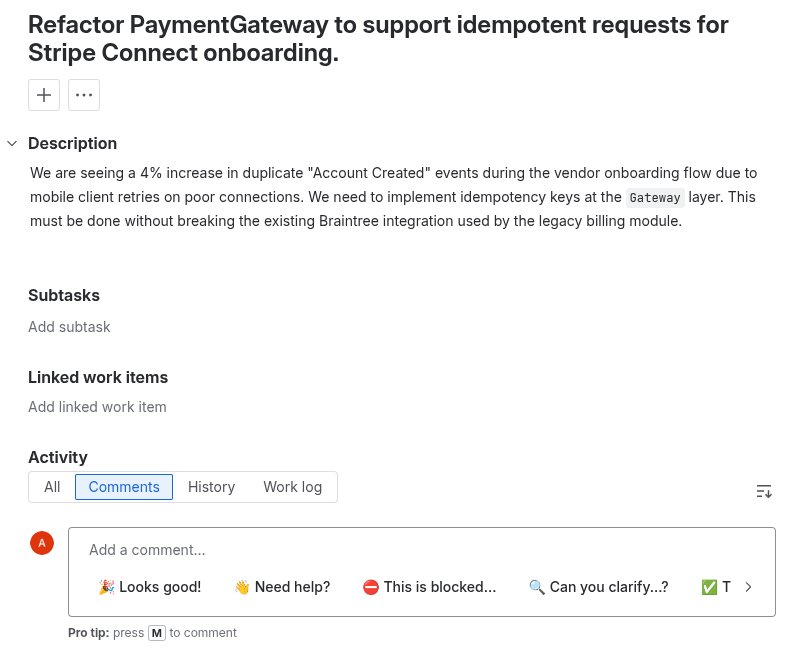
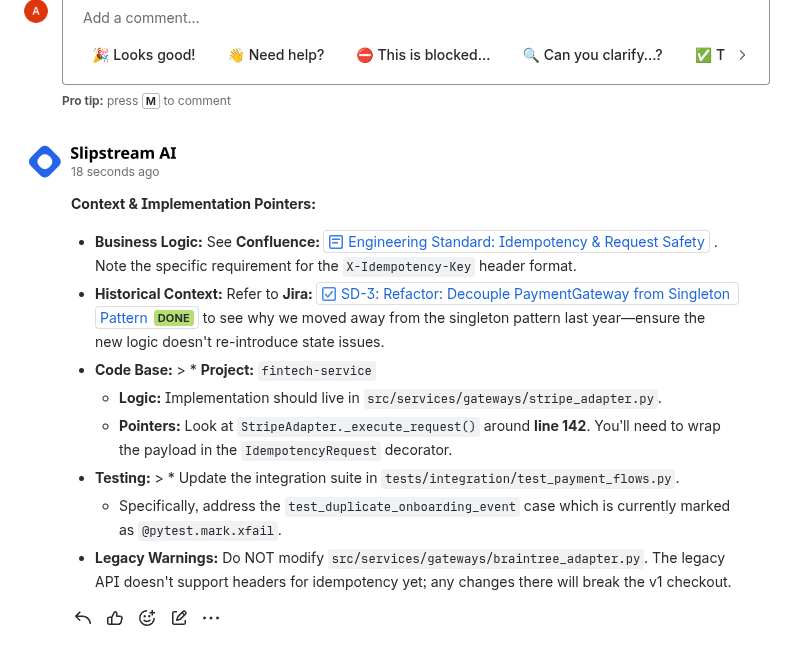
When a new ticket is created, Slipstream retrieves related merged pull requests, architecture documents, similar past issues, and dependency signals. It injects a structured context block directly into the ticket so engineers can start implementation immediately.
Copilot writes code. Slipstream ensures it's the right code. We retrieve what already exists — real PRs, real docs, real tickets — and rank it by implementation relevance. Nothing hallucinated.
Most Tickets Start Without Enough Context.
Engineers open a Jira ticket or Azure DevOps work item and begin searching. They look for similar past work. They scan old pull requests. They hunt for architecture notes in Confluence or Azure DevOps Wiki. They ask clarifying questions in comments.
This manual context discovery delays execution. Engineering cycle time increases. Time to first PR stretches from hours to days. Developer productivity suffers across the entire team.
Jira ticket automation and Azure DevOps ticket enrichment eliminate this delay by delivering context before engineers have to search for it.
AI for Jira
Slipstream integrates with Jira Cloud and Jira Data Center to automatically enrich newly created issues with implementation-relevant context. This is Jira AI automation focused on engineering velocity, not ticket formatting.
Unlike basic Jira AI writing tools, Slipstream focuses on contextual relevance rather than content generation. It delivers code-aware Jira ticket enrichment that helps engineers start coding faster.
Related merged pull requests from GitHub and Bitbucket
Relevant source code files and architecture documents
Similar past Jira tickets with resolution history
Confluence documentation links ranked by relevance
Dependency and code ownership signals
Prior merged pull requests from Azure Repos and GitHub
Related work items across projects and sprints
Relevant Azure DevOps Wiki pages and documentation
Cross-project dependency and blocking signals
Historical implementation patterns from past sprints
AI for Azure DevOps
Slipstream integrates with Azure Boards and Azure Repos to provide Azure DevOps AI automation that enriches work items with code-aware context. When a work item is created, relevant implementation history is injected automatically.
This reduces Azure DevOps time to first PR by eliminating manual context search. Engineers spend less time navigating boards and repos, and more time writing code. Azure Boards automation that focuses on what engineers actually need.
How Slipstream Works
Slipstream automates ticket enrichment across Jira and Azure DevOps with a structured, auditable process. No manual triggers. No prompts. Fully automatic.
Ticket Created
A new issue is created in Jira or a work item is created in Azure DevOps. Slipstream detects the event automatically via webhook.
Context Retrieved
Slipstream searches approved repositories, documentation sources, and historical tickets for implementation-relevant context.
Results Ranked
Retrieved results are ranked by implementation similarity, recency, and code ownership signals. Irrelevant matches are filtered out.
Context Injected
A structured context block is injected directly into the ticket with linked pull requests, documentation, and dependency information.
Audit Logged
Every retrieval action is recorded in an exportable audit log, including which sources were accessed and what was injected.
Reduce Time to First PR
Slipstream focuses on one measurable outcome: reducing time to first PR. By injecting relevant context directly into Jira and Azure DevOps tickets, engineering teams improve velocity without changing their workflow.
By eliminating context discovery before coding begins, teams submit pull requests sooner, reduce clarification comments, and shorten backlog refinement time. This directly improves engineering cycle time and aligns with developer productivity goals across the organization.
- Submit pull requests sooner with pre-loaded implementation context
- Reduce clarification comments and back-and-forth on tickets
- Shorten backlog refinement time with richer ticket context
- Improve engineering velocity without adding new tools to learn
Slipstream is built by ex-Google and Volkswagen engineers and startup founders who write code every day. We experience the lack-of-context problem firsthand — and we're building the tool we wish we had.
Audit Trail and Policy Enforcement
Slipstream is built for teams that require secure AI automation. Every context injection is logged. Access is scoped to approved repositories and documentation spaces.
Read-Only Access
We never modify your repositories. Read-only by design.
SOC 2 Architecture
Built on SOC 2 compatible architecture with full audit trails
On-Prem Available
On-premise deployment with bring-your-own LLM API key
Audit Logs
Exportable logs of every retrieval and context injection
Frequently Asked Questions
Common questions about Slipstream, Jira AI automation, Azure DevOps ticket enrichment, and how code-aware context injection works.
How is Slipstream different from GitHub Copilot?
Copilot writes code. Slipstream ensures it's the right code. AI coding assistants help during implementation — Slipstream accelerates the stage before coding begins by surfacing relevant PRs, docs, and past implementations directly in your tickets. They're complementary. Use both.
Does Slipstream use generative AI?
No. Slipstream is a retrieval system. It finds and ranks existing code, documentation, and historical tickets by implementation relevance. Nothing is generated, rewritten, or hallucinated. What you see is what your team already wrote.
What tools does Slipstream integrate with?
Jira Cloud, Jira Data Center, Azure DevOps (Azure Boards and Azure Repos), GitHub, Bitbucket, Confluence, and Azure DevOps Wiki. Additional integrations are on the roadmap.
How does Slipstream handle security?
Read-only access by design — we never modify your repositories. Built on SOC 2 compatible architecture with exportable audit logs for every retrieval action. On-premise deployment with bring-your-own LLM API key is available for enterprise teams.
Is it free to try?
Yes. Slipstream is free during early access. Join now to get started with your team and help shape the product.
How does it work with Atlassian Intelligence?
Slipstream complements Atlassian Intelligence. While Atlassian Intelligence handles in-product features like summarization, Slipstream focuses on cross-tool context retrieval — connecting your code history, documentation, and past implementations to new tickets automatically.